


Lufthansa
4.81.68K Reviews
App Specs
- Version
- 9.634.0
- Updated On
- License
- Free
- Downloads
- 10,000,000+
- Developer
- Lufthansa Group
- Categories
- Travel & Local
- Platform
- Android, iOS
Screenshots
 Analysis by AppCompare
I see the Lufthansa app as most useful when a trip is already tied to Lufthansa: it brings flight planning and day-of-travel tasks into one place, rather than trying to replace every travel tool on your phone. That focus is its strength, but it also means the app makes less sense if you usually fly with several airlines and want one neutral hub for all of them.
A practical role in a Lufthansa trip
Published by Lufthansa Group, this free travel app is for Everyone and runs on Android 10 or later. It has a 4.6 average from around 99,000 ratings, with over 10 million installs, which suggests it has become a familiar companion for many travelers. Its current version is 9.622.1; what matters more in everyday use is the straightforward purpose: keep the airline’s booking and flight information close at hand.
I would not treat it as a replacement for every part of trip planning. A broad flight-search service is usually better when I am comparing several airlines, routes, or travel dates. Once I have chosen Lufthansa, though, I prefer having the airline’s own app ready for the parts that depend on my booking. That distinction makes it easier to decide whether installing it is worthwhile.
Where the convenience really helps
For a simple trip, the useful payoff is less about flashy extras and more about avoiding small bits of friction. Keeping flight details on my phone means I can check the itinerary without digging through email, and online check-in can save time before reaching the airport. I still keep an eye on the airport information around me; an app is a helpful reference, not a reason to stop checking signs or listening for announcements.
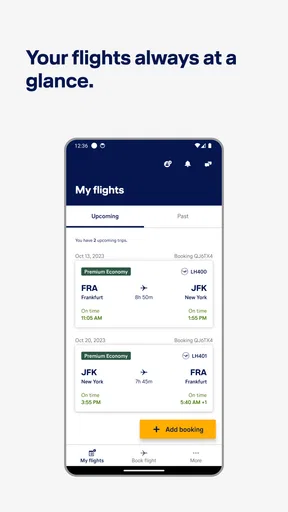
A realistic example is a work trip booked in advance, with an early departure and a connection later in the journey. I can review the itinerary before leaving home, handle check-in when it becomes available, and then use the app as a quick place to look up the flight details while moving through the airport. The value is cumulative: fewer searches through messages, fewer moments wondering which booking email is current, and a clearer starting point when plans need attention.
There is also a sensible trade-off in keeping the airline’s own app alongside a general travel organizer. The Lufthansa app is the more direct place to manage a Lufthansa journey, while a calendar or trip-planning tool may be better for combining hotels, trains, and flights from different providers. I would avoid entering the same trip details into several apps unless I actually need that broader overview; duplication can create confusion when one copy is updated and another is not.
Seamless Travel Experience
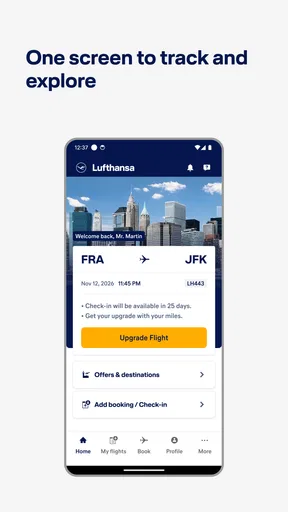
First things first, the Lufthansa app is all about making your travel experience as seamless as possible. From booking your flights to checking in, it’s all right there in the palm of your hand. No more juggling multiple apps or dealing with endless paperwork. Just a few taps and you're good to go!
Worth Reading Before You Choose

Flipboard Shows What News Apps Must Do Beyond the Feed

Switching to Android Auto Means Rethinking Your Driving Routine

Google Calendar Makes a Crowded Week Easier to Manage

Ludo King Makes the Most of the Minutes Between Plans

Baby Panda World Brings Quick Play to Modern Phones, but Its Game Library Feels Busy

ESPN’s Live Game View Makes Following Close Games Easier
Booking and Managing Flights
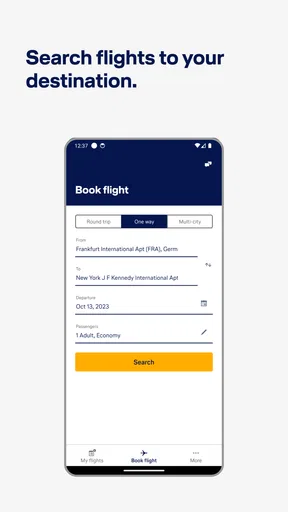
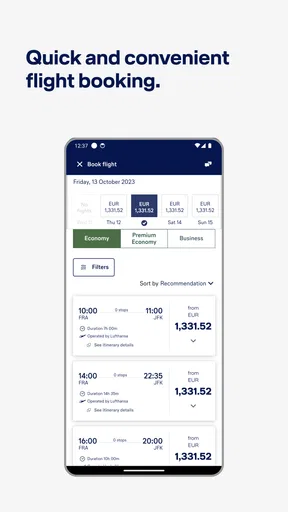
Booking flights through the app is a breeze. The interface is intuitive and user-friendly, so even if you're not tech-savvy, you won't have any trouble navigating it. You can search for flights, compare prices, and even find the best deals available. Once you’ve booked, managing your flights is equally straightforward. You can view your itinerary, make changes, or even cancel if necessary. It’s like having a personal travel agent right in your pocket!
Even if I am comfortable booking on a laptop, the phone is useful for checking the trip away from my desk. My advice is to compare the full itinerary before confirming, not just focus on the fare: departure times, connections, and the total shape of the journey all affect whether a flight is a good fit. For a complicated change, I would slow down and read each step carefully rather than assuming that a quick tap will solve everything. Travel changes can have consequences, and the app is a tool for handling them, not a substitute for checking what is being changed.
Check-in Made Easy
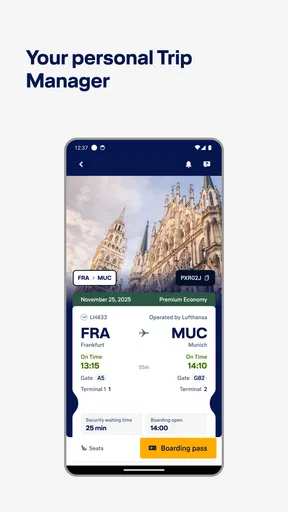
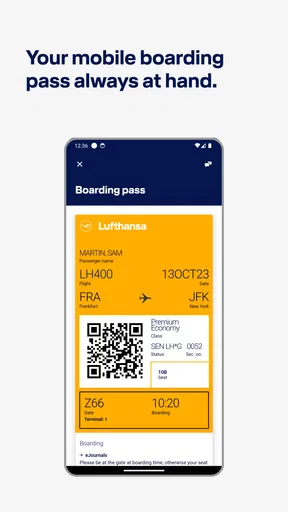
Gone are the days of standing in long lines at the airport. With the app, you can check-in online and download your boarding pass directly to your phone. It’s fast, convenient, and eco-friendly! Plus, you’ll get notifications about your flight status, gate changes, and more, keeping you in the loop at all times.
For a smoother departure, I would check in when the option becomes available, then make sure the boarding pass is easy to retrieve before arriving at the terminal. That small bit of preparation matters if mobile reception is weak or airport Wi-Fi is crowded. A phone pass is convenient, but I would not rely on it as my only plan: keeping the booking details accessible and ensuring the phone has enough charge are simple precautions that can prevent a stressful scramble.
Notifications are useful as prompts, not guarantees that I can ignore everything else. I would allow the alerts I genuinely want, then continue to watch airport displays, especially when a connection is tight or I am unfamiliar with the terminal. That approach makes the app a good second source of updates without letting a missed alert become the only reason I miss a change.
Stay Connected with Lufthansa
The app keeps you connected with all things Lufthansa. Whether you want to check your Lufthansa Miles & More account or stay updated with the latest news and offers, it’s all there. They’ve even got a section for travel tips and destination guides if you’re looking for a little inspiration for your next trip.
This is most valuable to people who already want to keep track of their relationship with the airline. If I am an occasional passenger who only needs a boarding pass, account-related information and airline news may be secondary; I can focus on the flight tasks and ignore the rest. If I travel with Lufthansa regularly, having those details close to the booking can make the app feel more complete than a basic itinerary viewer.
Customer Support at Your Fingertips
Need assistance? The app offers a direct line to customer support. Whether you have questions about your flight, need help with your booking, or just want some travel advice, help is just a tap away. The support team is friendly, knowledgeable, and always ready to assist.
I would see the support route as a convenient place to start, rather than a promise that every issue will be resolved instantly. If a departure is approaching, I would explain the situation clearly and keep the booking details handy; for an urgent airport problem, I would also use the assistance available at the airport instead of waiting on one channel alone. This is a practical limitation of any support feature: the right contact path helps, but timing and the nature of the issue still matter.
Interactive Features
One of the coolest features of the app is the interactive airport maps. These maps help you navigate through unfamiliar airports like a pro. No more wandering around aimlessly or getting lost. Just follow the map, and you’ll find your gate, lounge, or favorite coffee shop in no time.
Maps are especially useful when I have a short connection, arrive at a terminal I do not know, or need to orient myself before deciding where to stop. I would use them to get a sense of direction, then confirm the route with airport signs. A mapped route can reduce uncertainty, but it cannot account for every last-minute operational change or the pace at which a busy terminal fills up. If time is tight, heading toward the next flight first is a better choice than detouring for a café.
Personalized Experience
The app also offers a personalized experience tailored to your preferences. You can customize your notifications, choose your preferred language, and even set your favorite airports for quick access. It’s all about making your travel experience as comfortable and personal as possible.
Those settings are worth arranging before travel rather than while rushing through security. I would choose a language I can read quickly, keep alerts relevant to my trip, and add airports I visit often so they are easier to reach. The trade-off is that personalization takes a little setup and can become noisy if every update is switched on. A smaller set of useful alerts is more helpful than a phone that buzzes for information I do not need.
Who will get the most from it
I would recommend the app to people who book Lufthansa often, travelers who like having airline-specific flight details nearby, and anyone who prefers handling check-in on a phone. It can also be reassuring for an occasional flyer who wants one clear place to return to during a Lufthansa journey. Its travel category is broad, but its best use is specific: supporting the airline part of a trip rather than organizing every provider and reservation.
It is less compelling if you rarely fly Lufthansa, strongly prefer paper documents, or want a single app to manage flights from many airlines together. In those cases, a general travel organizer may give you a better overview, while the airline’s own app may still be worth installing only when a Lufthansa booking makes its tools relevant. I would also avoid expecting an app to remove the need for careful planning: checking the itinerary, allowing enough airport time, and verifying important travel details remain the traveler’s responsibility.
A balanced verdict for everyday travel
Overall, the Lufthansa app is a focused companion rather than a universal travel solution. Its mix of booking access, itinerary viewing, online check-in, airline updates, support, and airport maps gives Lufthansa passengers practical reasons to keep it installed. I like it most when it reduces last-minute searching and puts the next useful action within reach, not when I expect it to handle every part of a trip.
My recommendation is simple: if Lufthansa is part of your regular travel, try it and set it up before your next departure. If you fly the airline only occasionally, install it when you have a booking and decide whether its airline-specific convenience is worth keeping. Used with sensible backups and attention to airport announcements, it can make the travel day feel more organized without pretending that flying is ever entirely friction-free.
Pros
- User-friendly interface with intuitive navigation.
- Real-time flight updates and notifications.
- Easy mobile check-in and boarding pass access.
- Comprehensive travel guides and tips available.
- Offers exclusive deals and promotions for users.
Cons
- Occasional bugs in the booking process.
- Limited offline functionality.
- High data usage for real-time updates.
- Some features require account creation.
- In-app customer support can be slow.
FAQs for Lufthansa
What features does the Lufthansa app offer?
The Lufthansa app offers a comprehensive range of features to enhance your travel experience. These include flight booking, real-time flight status updates, mobile boarding passes, and easy check-in options. Additionally, the app provides personalized travel notifications, baggage tracking, and access to exclusive offers and promotions, ensuring a seamless journey from start to finish.
Is the Lufthansa app free to use?
Yes, the Lufthansa app is free to download and use on both Android and iOS devices. While the app itself does not require any payment, keep in mind that standard data charges from your mobile carrier may apply when accessing certain features or when using the app without a Wi-Fi connection.
How can I manage my bookings with the Lufthansa app?
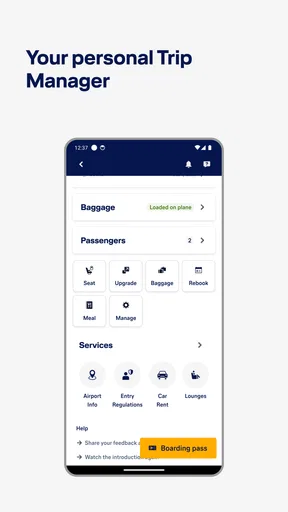
Managing your bookings with the Lufthansa app is simple and efficient. Once logged in, you can easily view and modify your reservations, select seats, and add extra services such as additional baggage. The app also allows you to save your travel documents and preferences for future bookings, making travel management more convenient.
Does the Lufthansa app support multiple languages?
Yes, the Lufthansa app supports multiple languages to cater to its global user base. You can change the language settings within the app to suit your preference, ensuring you can navigate and use the app comfortably, regardless of your language proficiency. This feature enhances accessibility for all users.
What should I do if I encounter issues with the app?
If you encounter issues with the Lufthansa app, there are several steps you can take. First, ensure you have the latest version of the app installed. If problems persist, check your internet connection and restart your device. For further assistance, you can contact Lufthansa's customer support through the app or visit their website for more detailed troubleshooting guidance.


